
Overview
metalite.ae supports adverse event (AE) analyses for clinical trials.
It uses ADaM datasets organized through the metalite
metadata structure and produces summary tables, specific AE tables, and
listings.
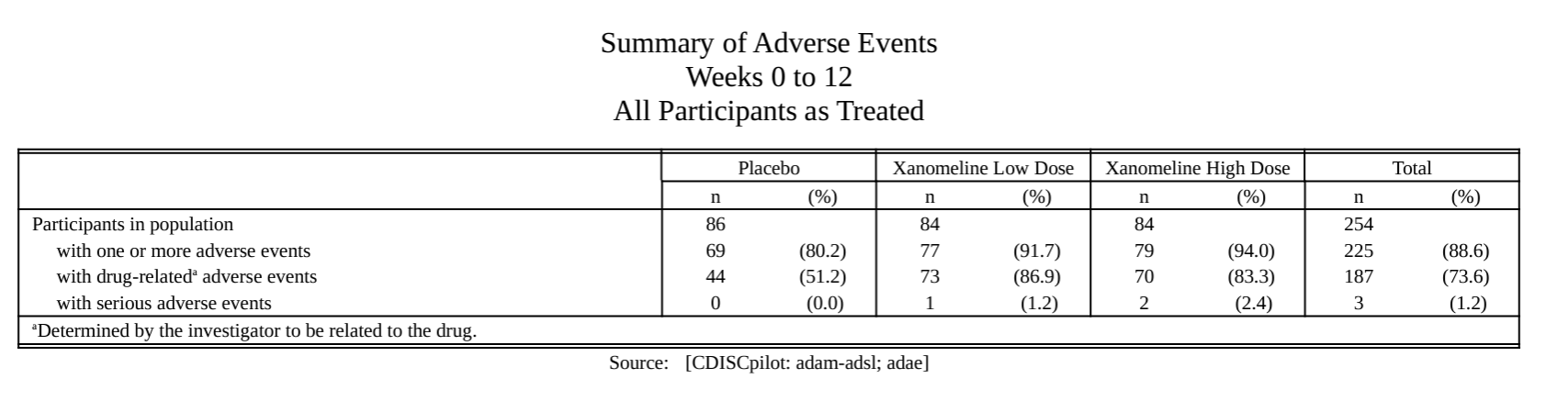
AE summary.
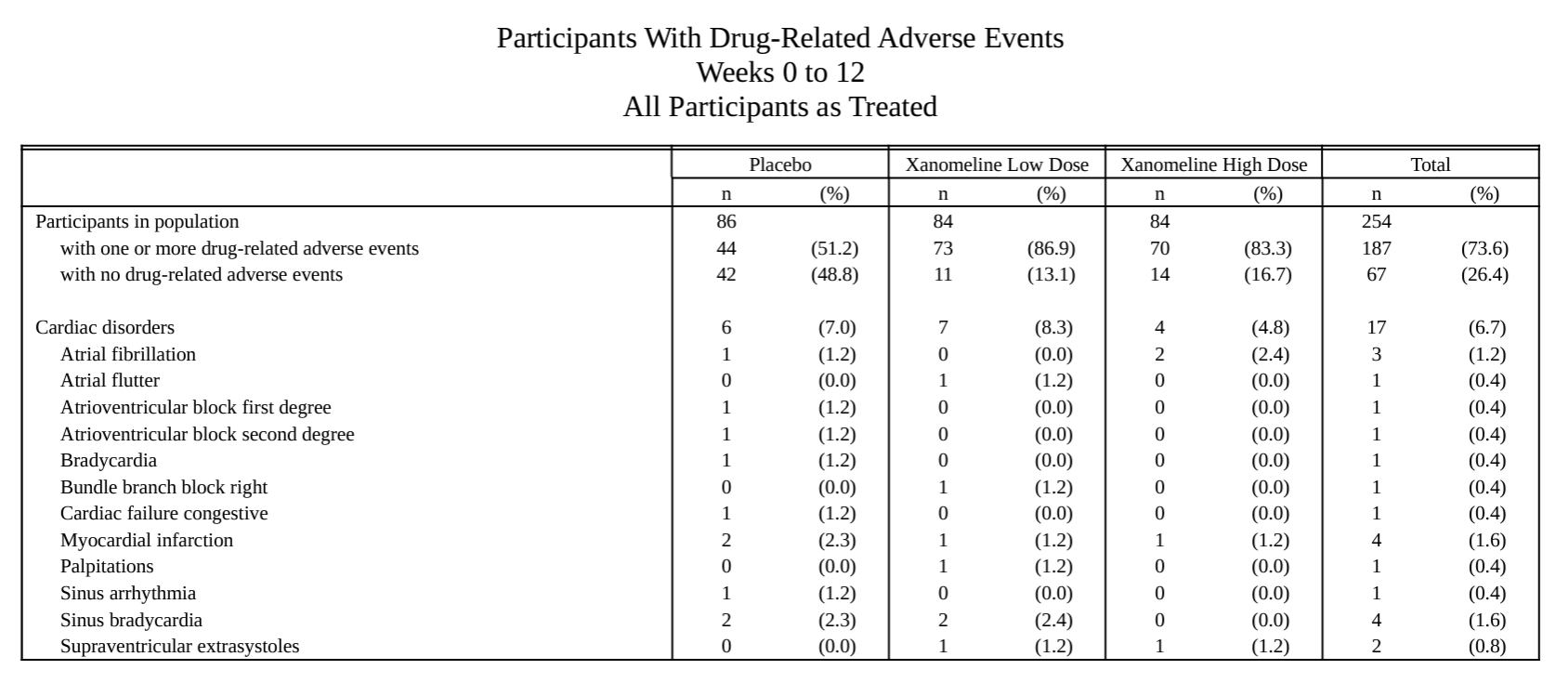
AE-specific table.
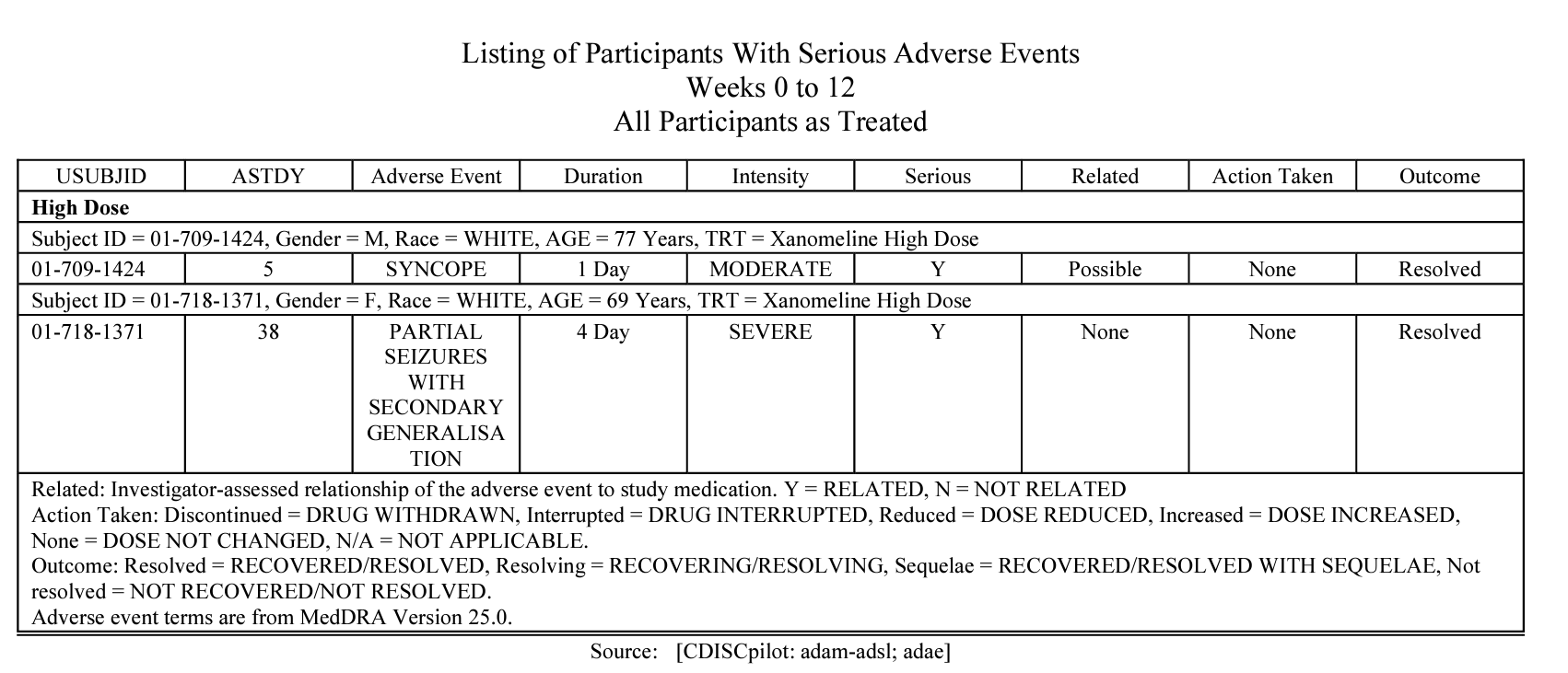
AE listing.
The shared metadata and consistent function interfaces support analysis definition, development, validation, and final reporting.
Highlighted features
- Reuse metadata definitions, such as the analysis population, across AE analyses.
- Use consistent inputs and outputs across preparation, extension, formatting, and reporting functions.
- Create mock tables from the planned output structure.
Workflow
The overall workflow includes the following steps:
- Define metadata with the metalite R package. See the metalite tutorial for a complete example.
- Prepare analysis data with a
prepare_*()function. - Optionally add statistics with an
extend_*()function. - Format the results with a
format_*()function. - Create a table, listing, or figure (TLF) with a
tlf_*()function.
The following example outlines the creation of an AE summary table.
Step 1: Define metadata
adsl <- forestly::forestly_adsl
adae <- forestly::forestly_adae

adsl$TRT01A <- factor(
  adsl$TRT01A,
  levels = c("Xanomeline Low Dose", "Placebo"),
  labels = c("Low Dose", "Placebo")
)
adae$TRTA <- factor(
  adae$TRTA,
  levels = c("Xanomeline Low Dose", "Placebo"),
  labels = c("Low Dose", "Placebo")
)

analysis_plan <- metalite::plan(
  analysis = "ae_summary",
  population = "apat",
  observation = "wk12",
  parameter = "any;rel;ser"
)

meta <- metalite::meta_adam(observation = adae, population = adsl) |>
  metalite::define_plan(analysis_plan) |>
  metalite::define_population(
    name = "apat",
    var = c(
      "USUBJID", "SAFFL", "TRT01A", "TRTDUR",
      "SITEID", "SEX", "RACE", "AGE"
    ),
    group = "TRT01A",
    subset = SAFFL == "Y",
    label = "All Participants as Treated"
  ) |>
  metalite::define_observation(
    name = "wk12",
    var = c(
      "USUBJID", "SAFFL", "TRTA", "AEDECOD", "AEBODSYS", "AEREL",
      "AESER", "AEOUT", "AEACN", "AESDTH", "ASTDT", "AENDT"
    ),
    group = "TRTA",
    subset = SAFFL == "Y",
    label = "Weeks 0 to 12"
  ) |>
  metalite::define_parameter(
    name = "any",
    term1 = "",
    term2 = "",
    var = "AEDECOD",
    soc = "AEBODSYS",
    label = "All AEs"
  ) |>
  metalite::define_parameter(
    name = "rel",
    term1 = "Drug-Related",
    term2 = "",
    subset = AEREL %in% c("POSSIBLE", "PROBABLE"),
    var = "AEDECOD",
    soc = "AEBODSYS",
    label = "Drug-related AEs"
  ) |>
  metalite::define_parameter(
    name = "ser",
    term1 = "Serious",
    term2 = "",
    subset = AESER == "Y",
    var = "AEDECOD",
    soc = "AEBODSYS",
    label = "Serious AEs"
  ) |>
  metalite::define_analysis(
    name = "ae_summary",
    title = "Adverse Event Summary"
  ) |>
  metalite::meta_build()
Step 2: Prepare the analysis data
x <- meta |> # Example AE data created using metalite
  prepare_ae_summary(
    population = "apat", # Select population by keywords
    observation = "wk12", # Select observation by keywords
    parameter = "any;rel;ser" # Select AE terms by keywords
  )
Step 3: Format the results
x <- x |> format_ae_summary()Step 4: Create the table
rtf_dir <- if (dir.exists("vignettes/rtf")) "vignettes/rtf" else "rtf"
rtf_file <- file.path(rtf_dir, "ae0summary1.rtf")

x |>
  tlf_ae_summary(
    source = "Source:  [CDISCpilot: adam-adsl; adae]", # Define data source
    analysis = "ae_summary", # Provide analysis type defined in meta$analysis
    path_outtable = rtf_file # Define output
  )
Generated RTF file: ae0summary1.rtf
See the package articles for complete workflows and additional examples.